> ## Documentation Index
> Fetch the complete documentation index at: https://docs.aicamp.so/llms.txt
> Use this file to discover all available pages before exploring further.
# How to Share a Project | AICamp
> Learn how to share your project with teammates or groups. Manage access levels, control visibility, and collaborate securely across the workspace.
AICamp lets you share a project with your team so everyone can collaborate using the same context, files, and chat history.
You can share projects with individuals, specific groups, or make them available to the entire workspace.
***
## How to Share a Project
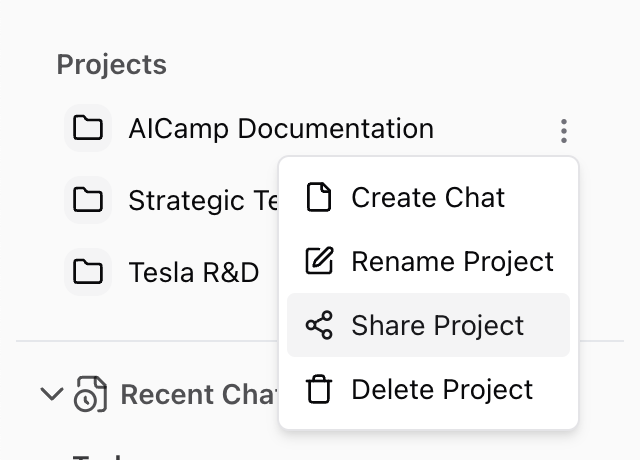
1. Open the project you want to share
2. Click the **three-dot menu (⋮)** in the top-right corner
3. Select **“Share Project”**
4. In the popup, choose how you want to share:
 ### Share with Individuals or Groups
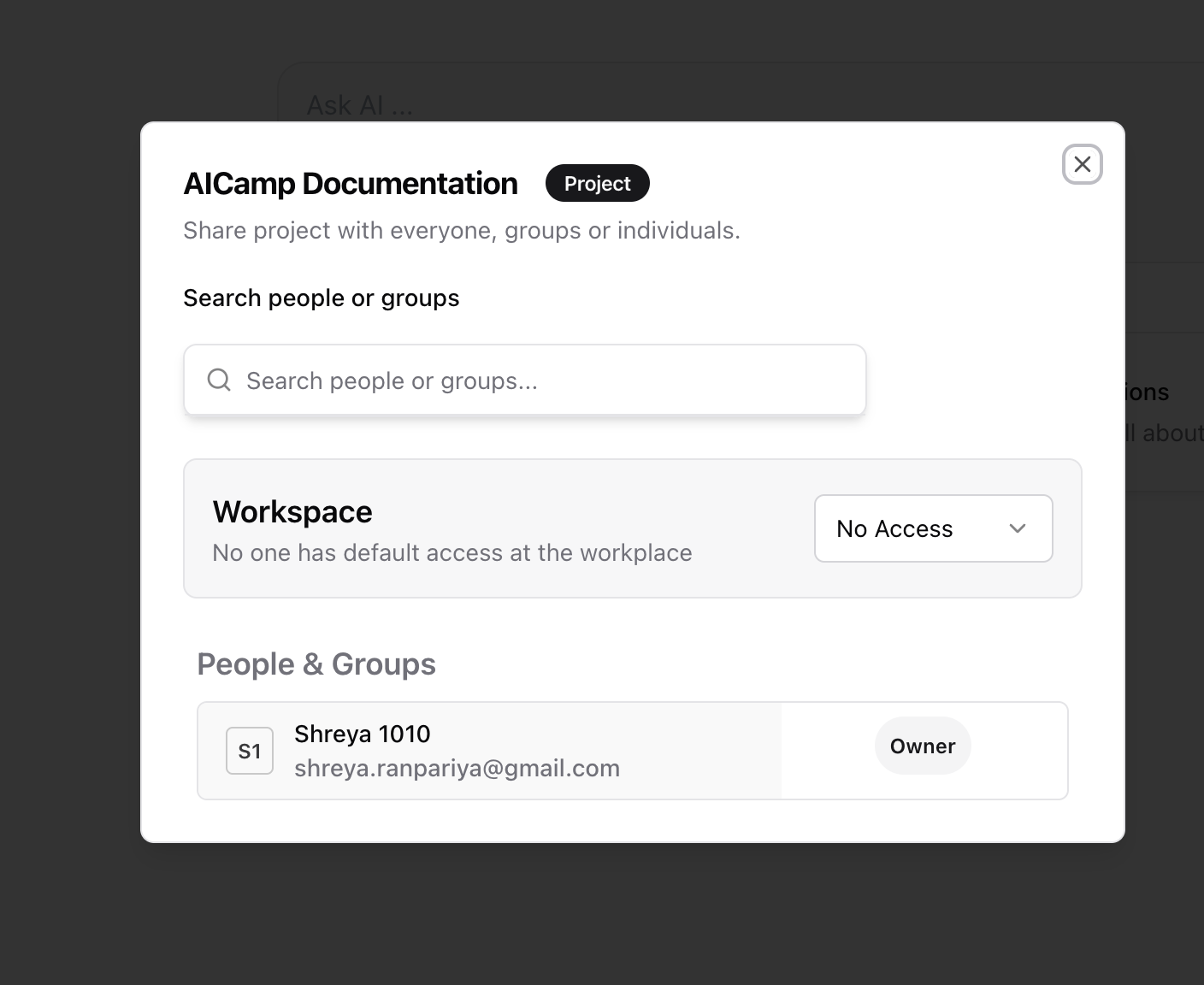
* Use the **search bar** to find teammates or groups
* Set access to:
* **Can View** – Can access the project, view chats, and use files
* **Can Edit** – Can add files, update instructions, and create new chats
You can remove access or update permissions at any time.
### Share with Individuals or Groups
* Use the **search bar** to find teammates or groups
* Set access to:
* **Can View** – Can access the project, view chats, and use files
* **Can Edit** – Can add files, update instructions, and create new chats
You can remove access or update permissions at any time.
 ### Make the Project Workspace-Wide
To make a project visible to everyone in your organization:
* In the share popup, find the **Workspace Access** section
* Choose:
* **No Access** – Only you (and those explicitly added) can see it
* **Can View** – Everyone in the workspace can open and use the project
* **Can Edit** – Everyone can make changes (use with caution)
*Workspace-shared projects are discoverable by all users and appear in the shared project list.*
***
## What Happens When You Share a Project
* All chats, files, and project instructions are visible to people you share it with
* New chats or files added later are automatically included
* Project context is preserved, so everyone works from the same base
***
## Best Practices for Sharing Projects
* Use **group sharing** for department-specific workflows
* Make key projects **workspace-visible** for central processes like onboarding, policy review, or content standards
* Limit “Can Edit” to trusted team members to avoid accidental changes
***
## What’s Next?
* [Create and Manage a Project](/projects/create-project)
* [Organize Knowledge Inside a Project](/projects/organize-project-knowledge)
* [Project Overview](/projects/project-overview)
### Make the Project Workspace-Wide
To make a project visible to everyone in your organization:
* In the share popup, find the **Workspace Access** section
* Choose:
* **No Access** – Only you (and those explicitly added) can see it
* **Can View** – Everyone in the workspace can open and use the project
* **Can Edit** – Everyone can make changes (use with caution)
*Workspace-shared projects are discoverable by all users and appear in the shared project list.*
***
## What Happens When You Share a Project
* All chats, files, and project instructions are visible to people you share it with
* New chats or files added later are automatically included
* Project context is preserved, so everyone works from the same base
***
## Best Practices for Sharing Projects
* Use **group sharing** for department-specific workflows
* Make key projects **workspace-visible** for central processes like onboarding, policy review, or content standards
* Limit “Can Edit” to trusted team members to avoid accidental changes
***
## What’s Next?
* [Create and Manage a Project](/projects/create-project)
* [Organize Knowledge Inside a Project](/projects/organize-project-knowledge)
* [Project Overview](/projects/project-overview)