> ## Documentation Index
> Fetch the complete documentation index at: https://docs.aicamp.so/llms.txt
> Use this file to discover all available pages before exploring further.
# Talk to Your Documents with Chat | AICamp
> Turn uploaded files into conversational interfaces. Ask about findings, extract data, compare docs, and get faster answers without manually scanning pages.
AICamp lets you upload files — like PDFs, DOCs, spreadsheets, or presentations — and ask questions about them directly in Chat.\
This allows you to extract insights, find key information, and navigate documents faster without reading line by line.
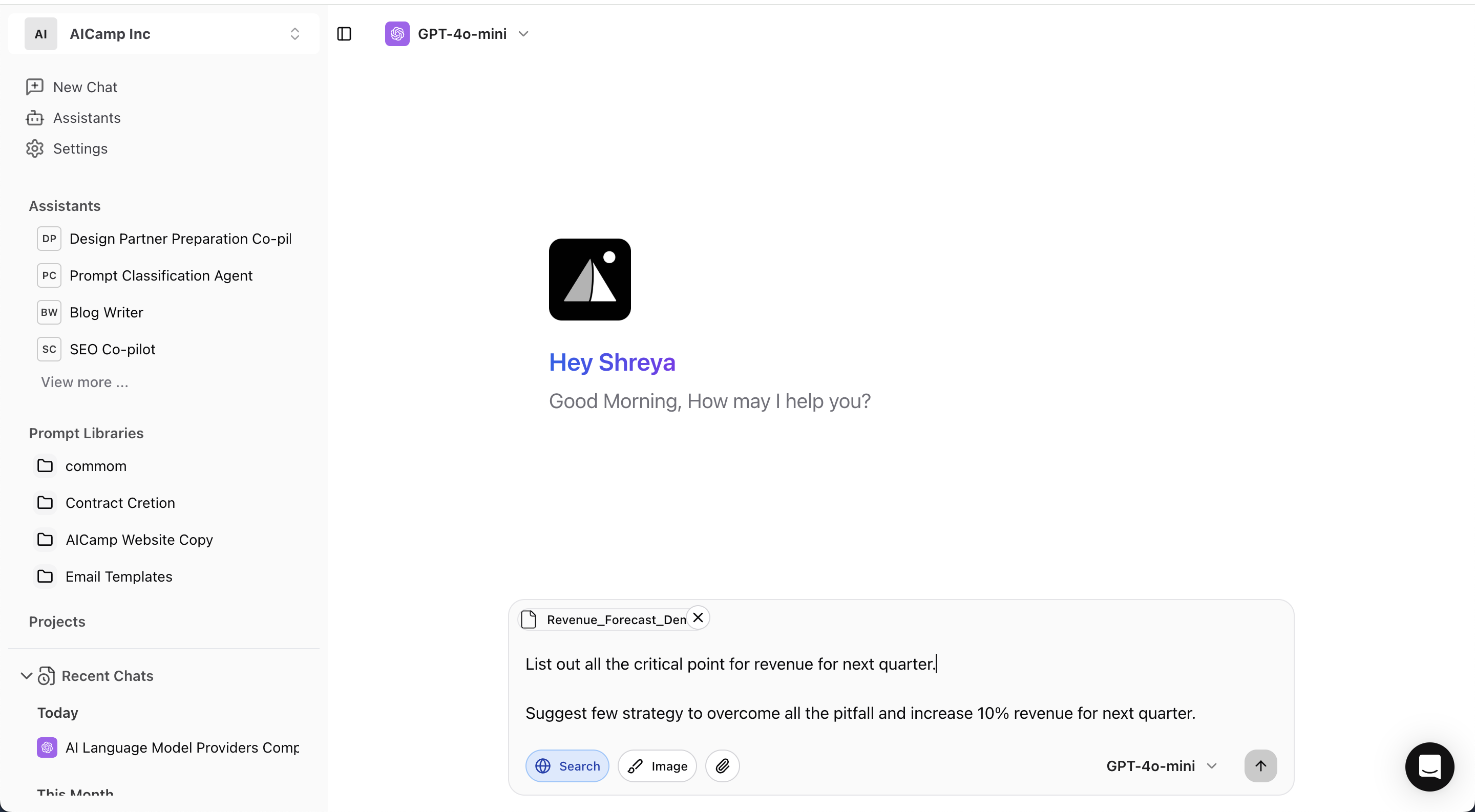 ## What You Can Do
* **Ask questions about your documents**\
Example: “What are the main findings in this report?” or “Summarize section 2.”
* **Search across large files quickly**\
Example: “Does this document mention project deadlines?”
* **Extract structured data**\
Example: “List all budget items and their amounts mentioned in this file.”
* **Understand complex content**\
Example: “Explain the legal terms used in this agreement.”
* **Use multiple files in one chat**\
Upload more than one document and ask comparative or connected questions.
### ✅ **Supported File Types**
#### **Documents**
* `.pdf`, `.doc`, `.docx`, `.odt`, `.txt`, `.md`, `.epub`
#### **Spreadsheets**
* `.xls`, `.xlsx`, `.ods`, `.csv`
### Presentation
* `.ppt`, `.pptx`, `.odp`
#### **Images**
* `.png`
* `.jpg` / `.jpeg`
* `.webp` (coming soon)
* `.gif` (static only) (coming soon)
> Note: Image analysis is available only in GPT-4 with vision
#### **Code**
* `.py`, `.js`, `.json`, `.html`, `.css`, `.xml`, `.yaml`, `.ipynb` (all are coming soon)
* You can also upload `.zip` files containing code or multiple assets.
*Some advanced formatting like embedded tables or charts may affect results. Always review critical outputs manually.*
## Structuring Your Input for Better Results
| Instead of | Ask Like This |
| :------------------ | :--------------------------------------------------------------- |
| Summarize this. | Summarize the executive summary section of this PDF. |
| What is this about? | What are the key recommendations made in this business proposal? |
| Extract info. | List all the risks mentioned in this report in bullet points. |
**Tips:**
* Reference document sections if known ("section 3", "last paragraph", etc.)
* Be as specific as possible to reduce ambiguity.
## Best Practices
* Use supported formats for better parsing.
* Give context if the file is long or complex.
* Double-check important summaries or extractions.
* For multiple files, clarify which one you're referring to.
## What You Can Do
* **Ask questions about your documents**\
Example: “What are the main findings in this report?” or “Summarize section 2.”
* **Search across large files quickly**\
Example: “Does this document mention project deadlines?”
* **Extract structured data**\
Example: “List all budget items and their amounts mentioned in this file.”
* **Understand complex content**\
Example: “Explain the legal terms used in this agreement.”
* **Use multiple files in one chat**\
Upload more than one document and ask comparative or connected questions.
### ✅ **Supported File Types**
#### **Documents**
* `.pdf`, `.doc`, `.docx`, `.odt`, `.txt`, `.md`, `.epub`
#### **Spreadsheets**
* `.xls`, `.xlsx`, `.ods`, `.csv`
### Presentation
* `.ppt`, `.pptx`, `.odp`
#### **Images**
* `.png`
* `.jpg` / `.jpeg`
* `.webp` (coming soon)
* `.gif` (static only) (coming soon)
> Note: Image analysis is available only in GPT-4 with vision
#### **Code**
* `.py`, `.js`, `.json`, `.html`, `.css`, `.xml`, `.yaml`, `.ipynb` (all are coming soon)
* You can also upload `.zip` files containing code or multiple assets.
*Some advanced formatting like embedded tables or charts may affect results. Always review critical outputs manually.*
## Structuring Your Input for Better Results
| Instead of | Ask Like This |
| :------------------ | :--------------------------------------------------------------- |
| Summarize this. | Summarize the executive summary section of this PDF. |
| What is this about? | What are the key recommendations made in this business proposal? |
| Extract info. | List all the risks mentioned in this report in bullet points. |
**Tips:**
* Reference document sections if known ("section 3", "last paragraph", etc.)
* Be as specific as possible to reduce ambiguity.
## Best Practices
* Use supported formats for better parsing.
* Give context if the file is long or complex.
* Double-check important summaries or extractions.
* For multiple files, clarify which one you're referring to.